

Using ATO Business Services to Track PAYG, BAS, and Super for Arborists
Published on November 24, 2025
If you run an arborist business in ACT, using ATO Business Services is one of the easiest ways to track Pay As You Go (PAYG), Business Activity Statements (BAS), and Super Guarantee obligations. Access government online services to manage tax and super tasks, from lodging statements to paying employees’ super—without the stress that builds up when deadlines are missed.
Why ATO Online Services Matter for Arborists
Many local arborists deal with swings in cash flow, slow client payments, and the extra load of keeping proper records. When business picks up, keeping track of dates, payments, and super contributions can feel overwhelming, especially if you’re a sole trader or principal authority managing jobs and admin. ATO online services for business put practical, step-by-step support at your fingertips. You can check what’s due, view details, select submit, and access support through digital tools or chat—available press alt—to save time and stay compliant.
Addressing these pain points matters. Not only do these services help you avoid late fees and keep the crew happy, but they make reviewing your tax record and obligations much simpler. By quickly linking information, adding new crew or jobs, and setting reminders, you stay ahead.
Finding myGov, RAM, and ATO business links confusing to set up?
Schedule a complimentary consultation with us today to correctly link your business, payroll, and ATO services.
How Arborists Use Government Online Services Daily
The most common issues for ACT arborists:
Income changes with the seasons, making it tough to match payments with tax due dates.
Delays in client payments risk falling behind on PAYG and SG obligations.
Extra admin to pay super and lodge regular BAS statements with limited help.
Setting up your myGov account and digital ID is the starting step for using online services for business. Once you’re verified as principal authority, you create and manage links to payroll, super, and BAS forms. The digital dashboard acts as a tax record register, letting you select link, check what’s outstanding, and view your progress.
Help is always available through ‘Ask Alex for help’, an easy chat option. If you’re unable to continue, available press alt plus 1 connects you to a digital agent who can help find answers, add missing information, or review any issues with your records.

Solutions for BAS, PAYG, and Super: Step-by-Step
Below you’ll find practical advice and workflow tips tailored for arborist businesses, whether you’re a sole trader or manage a growing team.
Setting Up Your Digital Account
Having a myGov account and digital ID is your access point. Use government online services to link your business, add employees or bookkeeper via RAM, and verify that everyone’s details and roles are current. Make sure to review the summary section where every link, detail, and pending action appears.

Lodging BAS with Confidence
Use the business online dashboard to locate your next BAS due. Check, enter, and review every figure for GST, PAYG, and super. You can upload digital invoices, set reminders, and use the select submit option to instantly lodge your statement. If payment is due, options like BPAY and direct debit are clearly listed for easy completion.
Always lodge a “nil” BAS if there’s no trading activity—never leave a statement blank.
PAYG Withholding and Payroll Management
Link your payroll software with government online services to automatically add and verify PAYG figures. You can review withheld amounts for each week, select submit, and match records in real time. If any payments or figures are unable to match, help is available on the dashboard or via chat.
Paying Super Guarantee On Time
Super contributions are tracked in the ‘Super’ section. Enter crew details, match each payment, and keep an eye on quarterly due dates. You can select ‘link’ to connect to SuperStream-compliant payroll software. If issues arise (e.g., unable to pay on time), use the available chat and set up a payment plan directly.
Always pay at least 11.5% per eligible employee as required and check last updated fields to confirm recent actions.
Grow your tree care business with Accounting Built for Arborists
From start-up to expansion, our accounting team supports your tax, payroll, and cash flow — so you can focus on running your business safely and profitably.
Workflows and Reminders for Busy Arborists
Success for many local arborists means blending fieldwork and admin.
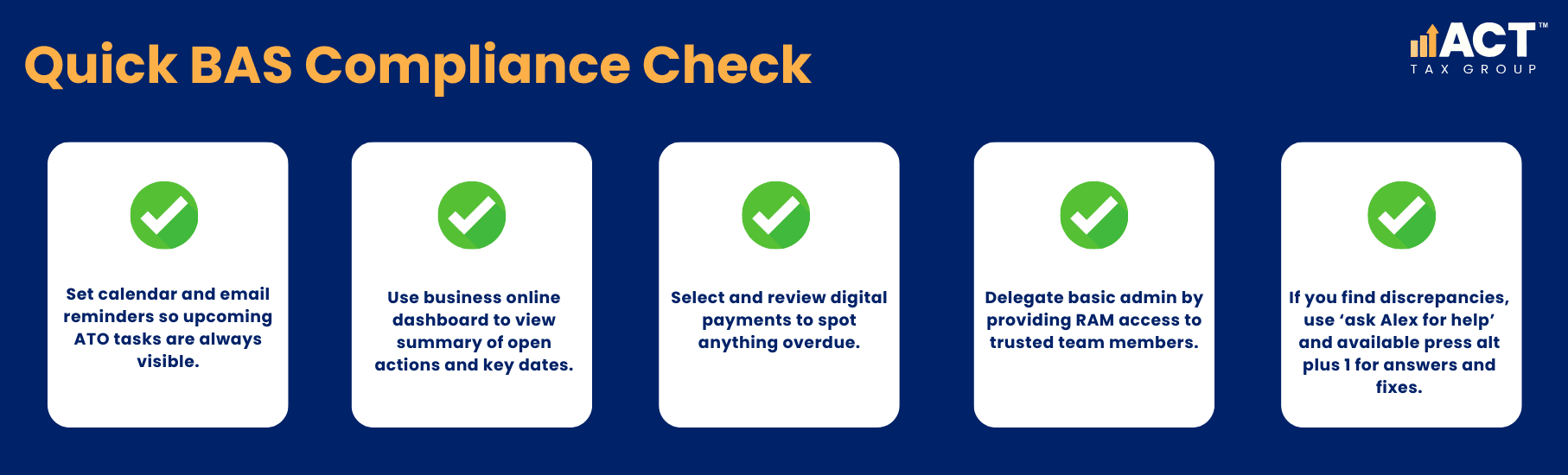
Regular attention to the dashboard helps avoid missed dates, and matching your tax records in real time lets you spot gaps before they become problems.
Conclusion
ATO business services and government online services make tax management and super payments less stressful for ACT arborists. Using digital tools lets you manage, pay, create, and link business obligations efficiently. Accessing online, setting reminders, and using chat support removes the guesswork. Whether you’re a sole trader or have a team, taking a few minutes each week to review and select tasks will keep you ahead.
Start now: create your myGov account, verify details, link your business, and use available support features for every step. If you get stuck, ask for help and get answers fast—so you can keep your focus on the work that matters most.

Lukasz Klekowski
Principal of ACT Tax Group, specialising in tax compliance and financial strategy for Australian small businesses.

Disclaimer: All information provided in this publication is of a general nature only and is not personal financial or investment advice. It does not take into account your particular objectives and circumstances. No person should act on the basis of this information without first obtaining and following the advice of a suitably qualified professional. To the fullest extent permitted by law, no person involved in producing, distributing or providing the information in this publication (including ACT TAX GROUP PTY LTD, each of its directors, councilors, employees and contractors and the editors or authors of the information) will be liable in any way for any loss or damage suffered by any person through the use of or access to this information. The Copyright is owned exclusively by ACT TAX GROUP PTY LTD (ABN 31634338088)