

The ATO Business Portal: Essential Tools for Carpenters
Published on October 20, 2025
The ATO Business Portal—now called Online Services for Business—has become an essential digital workspace for carpenters trying to stay on top of their tax and super obligations without drowning in paperwork. If you’re juggling multiple crews, managing progress claims, and trying to track down receipts while cash sits tied up in retentions, this portal can help you see exactly where your business stands with the Australian Government at any given moment.
What Online Services for Business Actually Does for You
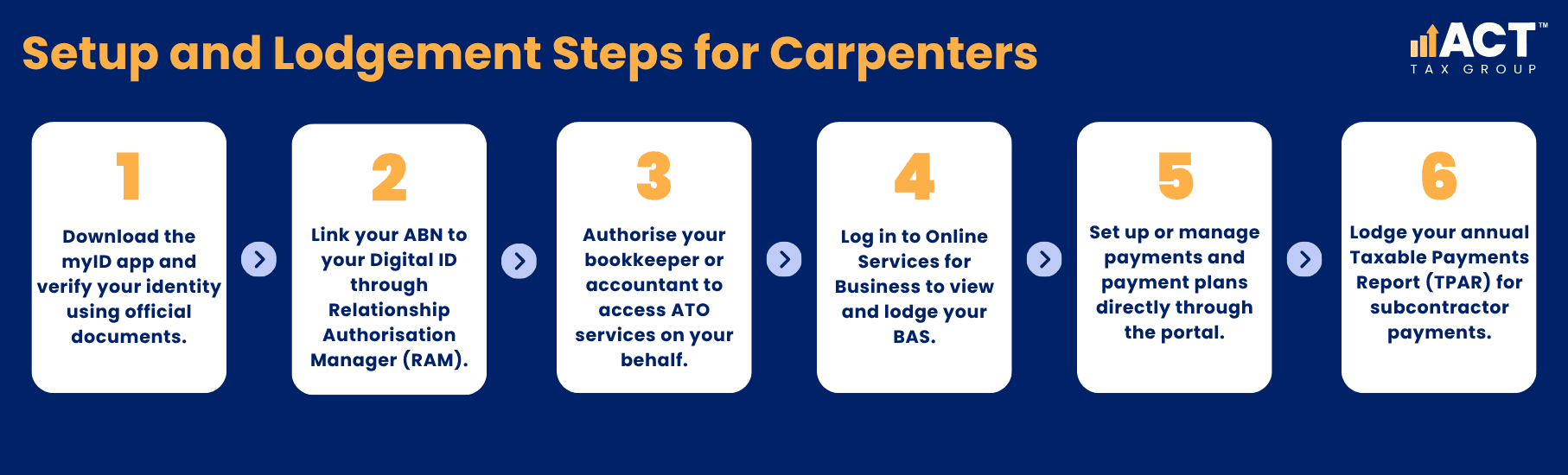
Online Services for Business replaced the old portal in 2021 and brought a more simplified experience for business owners. This cloud-based service lets you access your business tax affairs from any device.
Through the portal, you can view and lodge your activity statements, check account balances, set up payment plans if cash flow gets tight, and manage your GST and Pay As You Go (PAYG) instalments. For carpenters who need to report payments to subcontractors, you can also lodge your Taxable Payments Annual Report directly through the system.
The portal displays upcoming lodgment and payment due dates on your home screen, so you’re not caught off guard when your quarterly statement is due. You can switch between multiple Australian Business Numbers with a single log in if you operate more than one entity and view your income tax record history going back years.
Need help linking your ABN through Digital ID and RAM?
Schedule a complimentary consultation with us today to get your online access correctly set up.
Getting Access: The Digital ID and RAM Setup
To access ATO online services, you need two things: a Digital ID (usually myID, formerly called myGovID) and authorisation through Relationship Authorisation Manager. The setup process requires downloading the myID app to your smartphone or tablet and using it to verify your identity with documents like your driver’s licence and passport.
As the business owner or director, you’re the principal authority who needs to link your ABN to your Digital ID in Relationship Authorisation Manager first. This must happen before you or anyone else—like your bookkeeper or accountant—can access the system on behalf of your business. Once you’re set up, you can authorise other users to access the portal, either as an authorised user who can view and transact, or as an authorised administrator who can also manage other users.
The Australian Business Register must have your current business details before you start the link process in RAM, otherwise you may run into issues when you try to confirm your identity. If you previously used AUSkey, your authorisations should have automatically carried over to the new system.
Lodge Your Activity Statements Without the Last-Minute Scramble
One of the most practical features for carpenters is the ability to view, prepare, and lodge your Business Activity Statement directly through the portal. Your activity statement reports your Goods and Services Tax collected and paid, PAYG withholding for employees, and PAYG instalments toward your income tax.
When you’re ready to lodge, the portal guides you through each section—GST on your sales and purchases, amounts withheld from wages, and any other applicable taxes. You can save your progress and come back to it later, which is handy when you’re interrupted by a site call or a subcontractor question. Once you’ve completed all mandatory fields and ticked the declaration, you can lodge directly and receive a confirmation receipt with a unique reference number.
If you lodge electronically, you may receive an additional two weeks to lodge and pay your activity statement, giving you a bit more breathing room to get your tax record in order. For quarterly lodgers, this extension can make the difference between a rushed submission and a properly reviewed one. The portal also allows you to revise a previously lodged activity statement if you spot an error, though this option is only available when the system allows revision for that particular statement.

Managing Payments and Payment Plans
Cash flow is a constant challenge when you’re waiting on retentions or dealing with slow-paying builders. Online Services for Business lets you view all your tax accounts in one place—your Activity Statement account, Income Tax account, and any other accounts you hold with the ATO.
You can see your current balance, transaction history, and payment reference number, which you’ll need when you’re ready to pay. If you can’t pay the full amount by the due date, the portal allows you to set up a payment plan directly online for debts under $200,000. The system guides you to pay what you owe in the shortest time possible while helping you manage cash flow constraints.
You’ll select your payment method (direct debit is recommended to avoid missed instalments), choose a payment frequency—weekly, fortnightly, or monthly—and set the dates that work with your cash cycle. The portal calculates suggested instalment amounts based on what has worked for other businesses in similar circumstances, though you can adjust these amounts within certain limits.
Report Subcontractor Payments Through TPAR
If your carpentry business primarily operates in building and construction and you pay contractors or subcontractors, you’re required to lodge a Taxable Payments Annual Report by 28 August each year. This report tells the ATO how much you paid each contractor, including their ABN, name, address, and the GST component of those payments.
The report must include the total payment amount even if an invoice includes both labour and materials. However, you don’t need to report unpaid invoices as of 30 June, payments for materials only where labour was incidental, or amounts paid to employees through your payroll.
Online Services for Business allows you to lodge your report directly through the platform. You’ll need to have accurate details for each contractor, which you can verify using the ABN Lookup tool also available through ATO business services. The ATO uses this data to cross-check what contractors report on their own tax returns, so accuracy matters—not just for your compliance, but for maintaining good relationships with your subcontractors.
View Your Tax Record and Super Reports
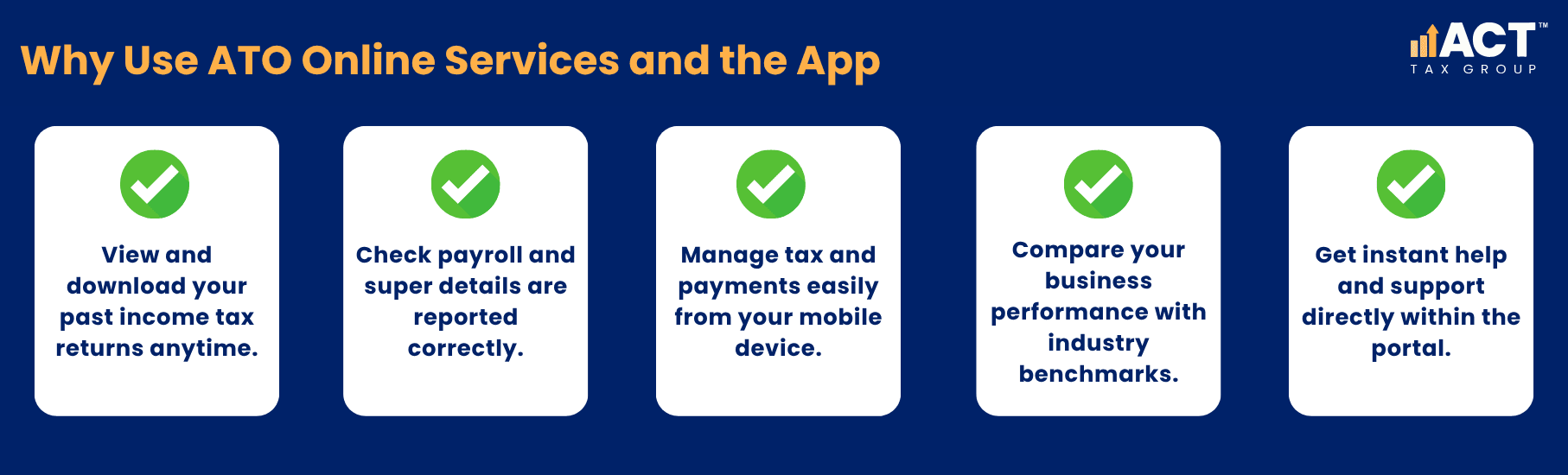
While you can’t lodge income tax returns through Online Services for Business (you’ll need Standard Business Reporting enabled software or a tax agent for that), you can view and print lodged income tax returns from the portal. Returns are displayed in your lodgment history, and you can view details and save them as a PDF for your records or for when you’re applying for finance.
The portal also allows you to monitor Single Touch Payroll reports, which show the wages, super, and PAYG withholding you’ve reported to the ATO each time you run payroll. This visibility helps you confirm that your payroll software is correctly reporting to the ATO, and that your Super Guarantee obligations are being met on time.
Access on the Go With the ATO App
For carpenters who are rarely at a desk, the ATO app provides many of the same features as Online Services for Business, accessible from your smartphone and other mobile devices. You can view key dates for lodgments and payments, check your tax accounts, and use tools like ABN Lookup to verify a supplier’s GST registration on site.
The app also includes the Business Performance Check tool, which lets you compare your carpentry business against benchmarks for your industry. By entering basic details like turnover and expenses, you can see if your cost of sales, labour costs, and motor vehicle expenses fall within typical ranges for other carpentry businesses. Being outside the benchmark doesn’t automatically mean trouble, but it may prompt questions from the ATO, so it’s worth checking before you lodge.
If you’re unable to find what you need or have questions while using the service, there’s help available. The portal includes options to ask Alex for help—an automated assistant that can point you in the right direction based on common questions. For urgent matters, you can continue to contact the ATO by phone during business hours, though many answers to common questions can be found directly within the portal to save you time.
Getting Help When You Need It
When you log in to use online services, you’ll notice several support options built into the system. If you’re stuck on a particular screen or need to understand what information to enter, there’s an option to access help specific to that section. You can also set up notifications so you’re reminded of key dates and don’t miss important lodgment deadlines.
For business owners working with an accountant or bookkeeper, you can authorise them to access your account through RAM. This means they can view your information, lodge on your behalf, and manage your activity statements without needing your password or asking you to log in every time they need to check something. This access continues until you decide to remove it, giving you control over who can see and manage your tax affairs.
If you’re a sole trader, you might find that linking through your myGov account is another option that works well. This path is particularly useful if you’re already using myGov for other government services and want to keep everything in one place. However, for companies and partnerships, the Digital ID and RAM path is the way to go.

Why This Matters for Your Business
Online Services for Business isn’t just another government system to navigate—it’s a tool that can save you time, reduce stress, and help you stay compliant without needing to call the ATO every time you have a question. When you can see your upcoming obligations, lodge your activity statements without printing forms, and set up payment plans when cash is tight, you’re better equipped to manage the financial side of your business while focusing on what you do best: delivering quality carpentry work.
The ability to access these services from multiple devices means you’re not tied to your office. You can check a payment status from the job site, confirm a lodgment went through while waiting for materials at the supplier, or set up a payment arrangement during a lunch break. That flexibility matters when your schedule is packed and you don’t have the luxury of sitting at a desk all day.
For more complex tasks like lodging your income tax return or detailed financial reporting, you’ll still need Standard Business Reporting (SBR) enabled software or work with your tax agent who uses these tools. But for the day-to-day compliance tasks—checking balances, lodging activity statements, and managing payments—the portal gives you direct access without waiting for someone else to do it for you.

Lukasz Klekowski
Principal of ACT Tax Group, specialising in tax compliance and financial strategy for Australian small businesses.

Disclaimer: All information provided in this publication is of a general nature only and is not personal financial or investment advice. It does not take into account your particular objectives and circumstances. No person should act on the basis of this information without first obtaining and following the advice of a suitably qualified professional. To the fullest extent permitted by law, no person involved in producing, distributing or providing the information in this publication (including ACT TAX GROUP PTY LTD, each of its directors, councilors, employees and contractors and the editors or authors of the information) will be liable in any way for any loss or damage suffered by any person through the use of or access to this information. The Copyright is owned exclusively by ACT TAX GROUP PTY LTD (ABN 31634338088)